SMS Consent
How ZachsApps collects consent for text messages · Updated September 30, 2026
0. Where the opt-in is, on a public page
The opt-in is on the public signup form. No account, login or payment is needed to see it:
The SMS consent checkbox appears under the phone field as soon as a phone number is entered (consenting to texts at no number would mean nothing). It is unchecked, and signing up does not require it.
Screenshots of that exact form, captured from the live site:
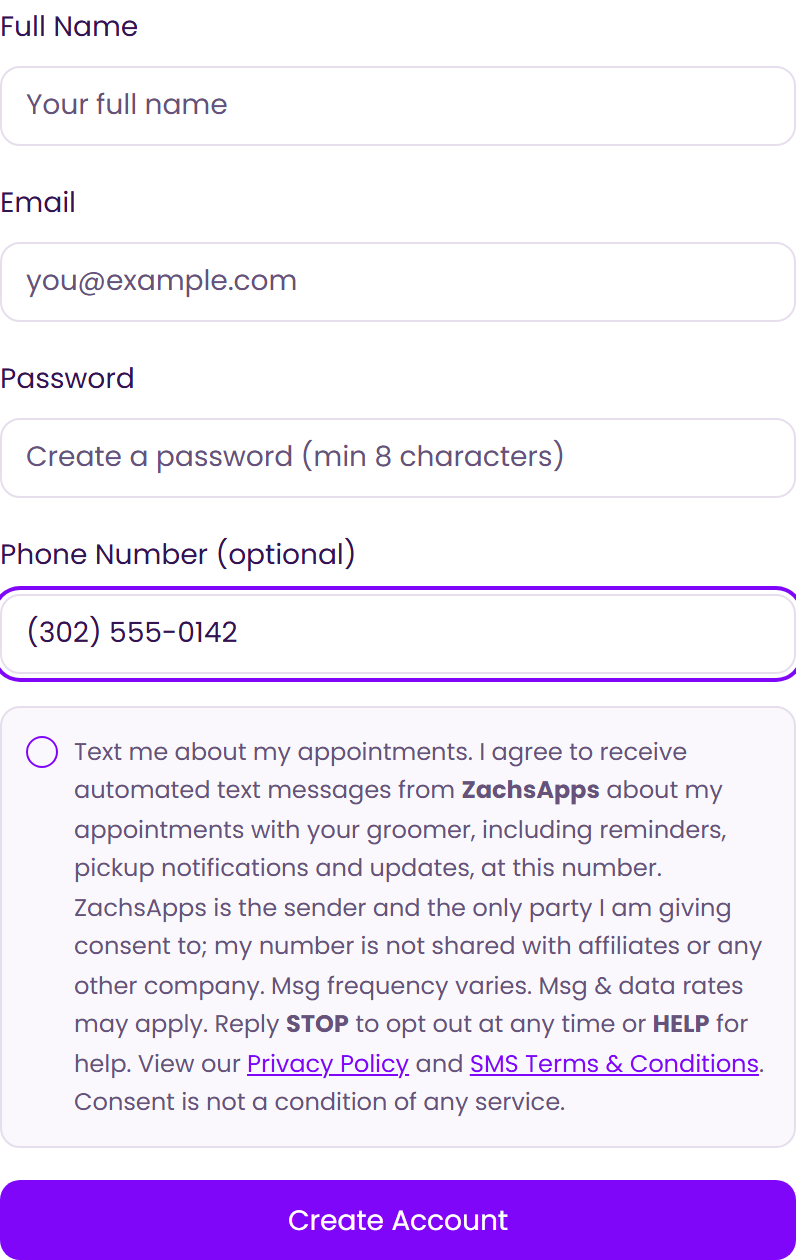
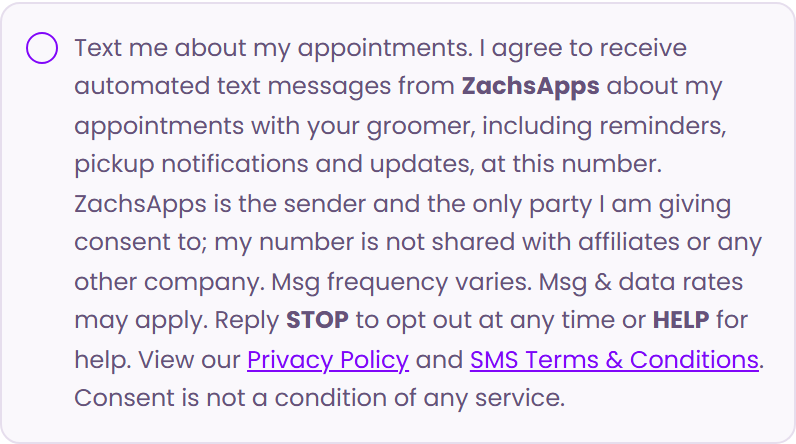
Existing customers who already have an account are asked the same question inside the app instead (section 2b below). Both wordings are reproduced in full in section 2.
1. What the program is
ZachsApps is a scheduling and customer-communication platform used by small service businesses: pet grooming salons and mobile groomers, landlords, and event organizers. Text messages are sent by ZachsApps to customers of those businesses, who have an existing service relationship with the business whose appointments they are booking.
Consent is collected by ZachsApps, for ZachsApps. Every message comes from ZachsApps and identifies itself that way; the business a customer booked with is named inside the message so the customer knows which appointment it is about. A customer is never asked to consent to messages from affiliates, marketing partners, or any other company, and a phone number collected under this program is never shared with or sold to one. Opting out stops all ZachsApps messages to that number.
No mobile information will be shared with third parties or affiliates for marketing or promotional purposes. All other categories exclude text messaging originator opt-in data and consent; this information will not be shared with any third parties.
After opting in, a customer may receive:
- a one-time code to verify the phone number they entered;
- a booking confirmation when they schedule an appointment;
- an appointment reminder one to two days before, with the date, arrival time or arrival window, staff member and location;
- day-of updates such as “your groomer is on the way, ETA about 15 minutes”, “running late”, or “your pet is ready for pickup”;
- a notice if an appointment is rescheduled or cancelled;
- occasional service announcements from the business they booked with.
Customers can reply to any message; replies go to the business and are answered in the same thread. Message frequency varies, typically two to six messages per appointment cycle, and a cycle is usually four to eight weeks. Message and data rates may apply.
2. Exactly what the customer sees
Consent is asked in two places, and both make the same promises. Each is reproduced below character for character. Nothing is pre-selected in either one, the customer must actively choose, and in neither case is consent required to sign up or to receive any service.
One word varies, and only one: the business name. Every salon books under its own name, so the sentence names the business whose appointments the texts are about — written below as Pawsitive Mobile Grooming, which is a sample, not a customer. Where a salon has not set a name, the form says your groomer instead of inventing one, and that is what the live signup page linked above shows today. The sender is ZachsApps in every case, which is what the rest of the sentence says.
2a. On the public signup form — the primary opt-in
This is the checkbox shown at grooming.zachsapps.com/auth?mode=signup, pictured in section 0. It appears under the phone field as soon as a phone number is entered.
2b. Inside the app — for customers who already have an account
A customer who signed up before this checkbox existed, or who signed up without giving a phone number, is asked once inside the app instead. Same sender, same promises, worded for that context.
We can text you when your pup is almost ready for pickup — no more sitting in the lobby wondering. Would you like to get pickup texts?
Both reproductions use the same demo business. “Pawsitive Mobile Grooming” is a demo business standing in for the customer’s own salon or service provider, which is named so the customer knows which appointment the texts are about. The party being consented to is ZachsApps in every case. This is a static reproduction — the live step appears inside the app after sign-in.
3. Number verification
Choosing "Yes, text me" takes the customer to their account settings, where they enter their mobile number and receive a one-time verification code by text. The number is marked verified only once they enter that code.
The customer’s choice, the time they made it, and the exact version of the wording above are stored with their record, so the disclosure any individual agreed to can always be reproduced.
4. Opting out and getting help
- Reply STOP (or STOPALL, UNSUBSCRIBE, CANCEL, END, QUIT) to stop all messages immediately. A confirmation is sent and no further messages follow.
- Reply START (or UNSTOP, or YES while opted out) to re-subscribe.
- Reply HELP for the business name, what the messages are, and how to opt out.
- Customers can also change the setting at any time in Account Settings.
- Consent is never required to receive service.
- We do not sell or share your SMS opt-in data, phone number, or personal information with affiliates, marketing partners, or any other third party, for marketing or any other purpose.
Full details: SMS Terms & Conditions, Privacy Policy and Terms of Service. Questions: admin@zachsapps.com.